
Global Market Raiders – NinjaTrader Tools

Proprietary third-party indicators and tools for NinjaTrader 8


Global Market Raiders LLC is an approved third-party vendor in the NinjaTrader Ecosystem. Our tools are designed specifically for NinjaTrader 8 Desktop and are listed within the official NinjaTrader Ecosystem.

For transparency, our vendor status can be independently confirmed by visiting the official NinjaTrader Ecosystem https://ninjatrader.com/ecosystem and locating the Zamora Bias Indicator under the Indicators category.


This section contains professional-grade trading tools independently developed by Global Market Raiders LLC for traders using the NinjaTrader 8 platform.

All tools are designed, coded, and maintained by Global Market Raiders and are intended to support discretionary decision-making, market structure awareness, and volatility-based analysis.

These tools were developed as part of our education-first trading methodology to help reinforce the concepts we teach through clear visual structure and market context — not as trade signals or automated systems.


Developer Notice:

All indicators in this folder are proprietary tools created by Global Market Raiders LLC.


These products are not affiliated with, endorsed by, or developed by NinjaTrader, LLC. Platform references are used solely to indicate compatibility.
NinjaTrader
Platform Requirement
This indicator runs on NinjaTrader. NinjaTrader is free to download and use for charting and simulation.

Education-Driven Indicator Development

Our proprietary NinjaTrader indicators were developed internally to support and reinforce the trading concepts we teach. They are designed as visual context tools—not trade signals—to help traders better understand bias, structure, and market conditions while maintaining full discretion.

(+) View Full Transcript

Most traders don’t struggle because they can’t find entries.


They struggle because they’re trading the right setup in the wrong environment.


If you trade lower timeframes, you’ve felt this before: everything looks correct — and the market just doesn’t cooperate.


What’s usually missing isn’t timing.

It’s context.


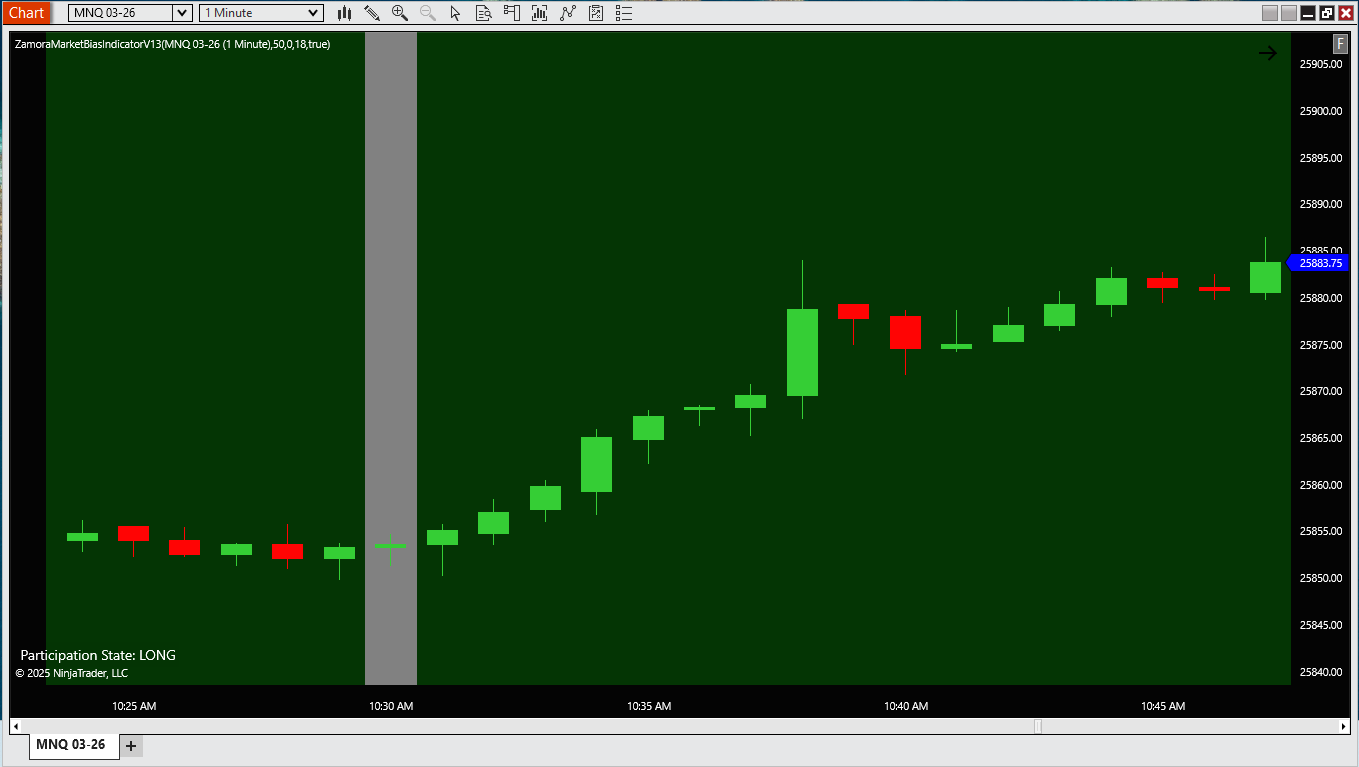
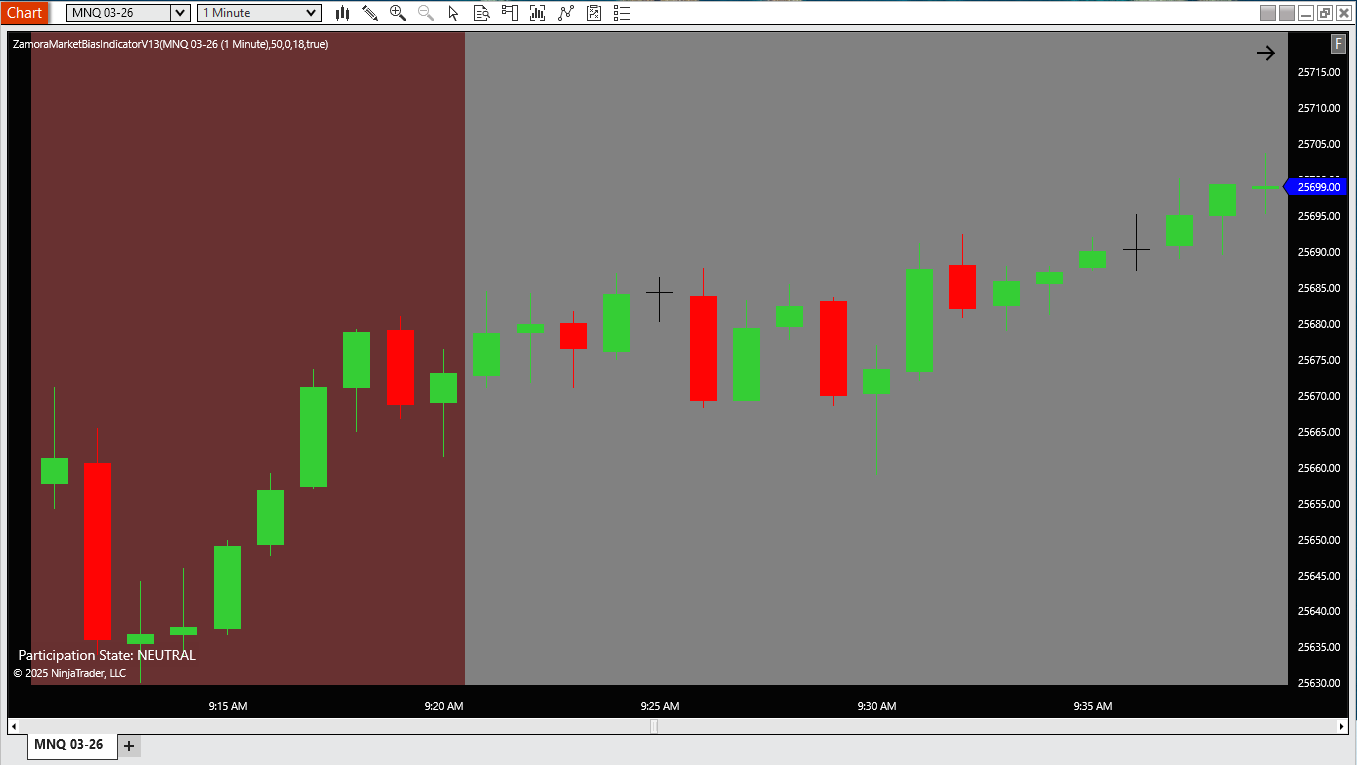
The Zamora Bias Indicator is a decision-support solution designed to show whether current conditions favor long participation, short participation, or neutrality.


It is a tool that does not generate buy or sell signals.


It doesn’t predict price.

And it doesn’t automate trades.


Instead, it helps you answer a more important question before you trade:


Does it even make sense to be looking for longs, shorts, or neither right now?


When bias is aligned, execution becomes easier. When it’s not, discipline matters more.


Neutral is intentional.


It exists to protect you from forcing trades during mixed or low-quality conditions — where most give-back happens.


Below, you’ll see how traders use Zamora Bias as a context filter — and whether it fits your approach.


Take your time.


Context always comes first.


https://www.globalmarketraiders.com/Zamora-Bias-Indicator


Zamora Bias Indicator — One-Time $197
Zamora Bias
Decision-support • 1-minute futures focus
Get Bias Context — $ 197
Built for disciplined participation, not constant signaling

Stop forcing trades. Trade with context.

The Zamora Bias Indicator is designed to address one of the most costly trader errors: participating without directional context. It defines when conditions favor Long , Short , or Neutral.

Designed for intraday futures traders who already have setups — but need objective directional context before execution.

Includes the indicator import file + quick-start guide + “Why Neutral exists” troubleshooting checklist (v1.0) — delivered instantly after secure checkout. NinjaTrader 8 Desktop (Windows 10/11).

✔ Immediate digital delivery after secure Stripe checkout.

Platform notice

Built for NinjaTrader 8 Desktop. Not affiliated with or endorsed by NinjaTrader.

Not financial advice. Trading futures involves substantial risk. This tool provides context and structure—not trade commands.

One-time purchase
No subscriptions
$ 197
What you receive after purchase
  • Indicator import file
  • Quick-start guide
  • “Why Neutral exists” behavior explanation + troubleshooting checklist
Full installation and usage guidance are provided after purchase to keep this page focused and uncluttered.
No subscriptions. No renewals. Lifetime access to the current major version.
Get Bias Context — $ 197

✔ Immediate digital delivery after secure Stripe checkout.

Click below to complete your one-time purchase. Stripe supports major cards and secure checkout. Not affiliated with or endorsed by NinjaTrader.
Questions? Email support@globalmarketraiders.com

Is this the right tool for you?

Zamora Bias is built for NinjaTrader 8 futures traders who already have trade ideas or setups, but want objective directional context(Long / Short / Neutral) before execution. It is not a signal service and does not automate trades.

This is for you if:
  • You already have entries, but struggle with when not to trade, especially in choppy conditions.
  • You trade intraday futures on NinjaTrader and want a clean, objective bias framework.
  • You value discipline over constant signaling, with Neutral treated as a valid stance.
Not for you if:
  • You want buy/sell alerts, entry calls, or a trade signal service.
  • You want automation, copy trading, or anything that places trades for you.
  • You expect guaranteed results or performance-based outcomes.

Reminder: Zamora Bias is decision-support software intended to reinforce discretionary participation. You remain responsible for trade selection, execution, and risk management.

Want to see how this context filter helps traders avoid forced participation? See what it solves →

1-Minute Bias vs Execution Timeframe

The Zamora Bias Indicator calculates market participation and directional context on the 1-minute chart to stay responsive to real-time intraday conditions.

This does not mean traders should enter trades every minute. Instead, bias provides a contextual framework — allowing traders to wait, sometimes minutes or longer, for price to align with structure, levels, and their execution rules.

Bias updates fast. Trades do not have to.

How long should I wait for a trade?

Faster charts do not require faster trades. Although the bias updates on the 1-minute chart, valid trade ideas may take time to develop — and some sessions will produce no trade at all.

This is intentional. The purpose of market bias is not to increase trade frequency. It exists to filter out poor conditions so that when a setup appears, it aligns with broader participation.

If no clean setup appears while bias is active, the correct decision is to do nothing.

Bias vs Execution (Simple Model)

BIAS (Context) 1-Minute Chart Updates Continuously Wait for alignment Levels • Structure • Confirmation EXECUTION 1m / 2-3m / 5m Discretionary Timing Bias updates fast. Trades do not have to.

What this solves

Most traders don’t lose because they “don’t know a setup.” They lose because they participate without context—especially on lower timeframes.

The solution

Zamora Bias defines participation boundaries so you can stop forcing trades and start operating with a clear market stance: Long / Short / Neutral.

Helps reduce directional guessing

Provides context before execution decisions so you’re not “picking a side” emotionally.

Helps reduce overtrading

Helps you avoid low-quality participation periods when conditions are not supportive.

Adds structure to discretion

Gives a clear stance so your discretionary entries happen inside supportive participation conditions.

Protects neutrality

Neutral is a valid stance. Zamora Bias makes “stand aside” a disciplined, visible decision.

“Why it sometimes does nothing”

Skeptical? Good. This is where most tools fail: they encourage constant activity. Zamora Bias is built to protect you from that.

Transparent by design

The indicator will withhold participation when conditions are not supportive. That “quiet” behavior is intentional—because it’s doing its job: protecting Neutral.

Prevents forced participation

Neutral blocks the boredom-trade loop where most retail drawdowns begin.

Protects your edge

Your setups perform best inside supportive conditions. Neutral helps you wait for alignment.

Reduces mental fatigue

A clear stance lowers decision noise—especially on the 1-minute chart.

Explained, not mysterious

Post-purchase guidance explains the “why” behind filtering so restraint isn’t misread as failure.

The simple takeaway

If it’s “doing nothing,” it’s often saving you from low-quality conditions that cause give-back: chop, mixed participation, and emotional entries.

Interactive demo: Participation Simulator

This is not a performance chart. It’s a simple way to understand Long / Short / Neutral in practice— and why Neutral is often the most disciplined decision.

Choose a bias state
Choose volatility context
Volatility note
Result

Neutral / Stand Aside

NEUTRAL is the disciplined stance

Do this
    Avoid this
      Reminder

      Participation Timeline

      Illustrates how participation context can shift over time (Neutral → Long → Neutral → Short). It is a behavior explainer, not a profit chart.

      STATE: NEUTRAL
      Behavior illustration only • No performance claims

      Why this state appears

      What a disciplined trader does

      Tip: Click “Play” to automatically cycle through state changes.

      FAQ

      Quick answers before you purchase.

      Is this a trade signal / alert service? Expand

      No. Zamora Bias is decision-support. It provides participation context (Long / Short / Neutral). You still decide entries, exits, and risk.

      Why does it sometimes show Neutral / “do nothing”? Expand

      Because Neutral is a feature. It’s designed to reduce overtrading during low-quality conditions (chop, mixed participation, emotional forcing).

      If bias is calculated on 1-minute, do I have to trade every minute? Expand

      No. The 1-minute chart keeps bias responsive to real-time participation. Trades are taken only when price aligns with your execution rules. Bias updates fast. Trades do not have to.

      What timeframe should I execute trades on? Expand

      Many traders keep bias on the 1-minute chart, then execute based on their plan: 1-minute (faster ideas), 2–3 minute (hybrid), or 5-minute (intraday continuation). Bias provides context; execution timing varies.

      What markets/timeframes is it designed for? Expand

      Built for NinjaTrader 8 Desktop. Works well on minute-based charts (1–3 minute friendly) and beyond.

      Does it place trades or access my brokerage account? Expand

      No. It does not place trades and does not require, request, or store brokerage credentials. It only displays a bias state on your chart.

      How do I get the download after purchase? Expand

      Digital delivery. After Stripe checkout you’ll receive download/next-step instructions via email. No physical shipment.

      What if I can’t install or run it? Expand

      We’ll help you. If we can’t resolve a verified technical issue, we’ll refund your purchase. For fastest support, send instrument + timeframe + timestamp + screenshot + NinjaTrader version/build.

      System requirements & compatibility

      Supported environment for running Zamora Bias.

      Platform
      • NinjaTrader 8 (Desktop)
      • Minimum supported build: 8.1.x
      Operating system
      • Windows 10/11
      • Desktop-only (NinjaTrader 8). Not mobile/web.
      Notes
      • Works on minute-based charts (1–3 minute friendly) and beyond
      • Commonly used on 1-minute charts across major index futures including NQ, MNQ, ES, MES, RTY, M2K, YM, and MYM
      • Designed to remain lightweight (minimal chart objects / clutter)
      • No collection of brokerage credentials or trading account access
      Security posture

      This indicator does not require, request, or store brokerage credentials. It does not place trades. It displays a bias state on your chart.

      Not affiliated / trademark notice

      NinjaTrader® is a registered trademark of NinjaTrader Group, LLC. No NinjaTrader company has any affiliation with the owner, developer, or provider of the products or services described herein, or any interest, ownership or otherwise, in any such product or service, or endorses, recommends or approves any such product or service.

      Policies • privacy • licensing

      Simple delivery, support, and licensing—clear expectations.

      Delivery

      Digital delivery. Download/next-step instructions provided after Stripe checkout. Digital product. No physical shipment.

      Support

      Email support. Typical response within 1 business day. Include instrument + timeframe + timestamp + screenshot for fastest help.

      For fastest help: instrument + timeframe + timestamp + screenshot (bias label visible).

      Refunds

      If you’re unable to install or run the indicator as intended, we’ll work with you to resolve the issue. If we cannot resolve a verified technical problem related to installation or functionality, a refund will be issued.

      Refunds are not provided for performance-based outcomes, strategy preferences, or market results.

      Privacy & data handling

      We do not collect trading data, brokerage credentials, or account access. Stripe handles payment processing. We only receive the information necessary to deliver support and product access (e.g., email address).

      Licensing & usage

      Single-user license (non-transferable). No redistribution.

      Updates

      Updates delivered via email/download link (or via NinjaTrader Ecosystem when enabled).

      Versioning • changelog • known issues

      See what’s included today and what’s coming next.

      Current version
      v1.0
      Release notes
      v1.0 — Initial release
      • Bias label (Long/Short/Neutral)
      • Soft background tint
      • Clean visuals
      • Support checklist + macros
      Next (planned updates)
      • More presets
      • Optional session filter UX
      • More documentation examples
      Known issues
      • If tint feels strong, reduce tint opacity in settings.
      • If label overlaps other tools, change label position/corner.
      • If indicator doesn’t appear, confirm it was imported and applied.
      Faster debugging template

      To confirm exactly why it skipped, please send:

      • Instrument + timeframe
      • Timestamp (include timezone)
      • Screenshot showing bias label + candles
      • NinjaTrader version/build
      Quick legal note (expand) Click to view
      This software is provided for educational/decision-support purposes and does not constitute financial advice. Trading involves risk. You are responsible for your own decisions and risk management.

      Get Zamora Bias

      One-time purchase. Clear participation context. Built to reduce forcing trades and improve alignment.

      Includes
      • Indicator import file
      • Quick-start guide
      • “Why Neutral exists” behavior explanation + troubleshooting
      Developer
      • Global Market Raiders LLC
      • Richard O. Zamora III, CMT

      Not financial advice. Past performance is not indicative of future results. You are responsible for your own risk.

      One-time price
      No subscription
      $ 197
      Get Zamora Bias — One-time $ 197

      ✔ Immediate digital delivery after secure Stripe checkout.

      Click below to complete your one-time purchase. Stripe supports major cards and secure checkout. Not affiliated with or endorsed by NinjaTrader.
      Need help? Email support@globalmarketraiders.com
      Global Market Raiders LLC
      © • All rights reserved
      Risk disclosure: Trading futures and derivatives involves substantial risk and is not suitable for all investors. This product is educational/decision-support software and does not guarantee results.